
Designing quilts and projects is one thing I really enjoy. Every quilter is a designer to a certain degree, when you take a pattern and add your own spin in terms of fabric selection, add or subtract sashing or borders, and finish it the way you like. At a recent quilt show, I was amazed at the number of medallion quilts. One was the Best of Show. I think of these kinds of quilts as round robin styles, starting with the center and just adding borders. Remember my Kaleidoscope Quilt? This would make a great center of a medallion quilt.

I did a simple medallion style for Fall Fortnight last year with a pumpkin applique. I used the block option to make the flying geese blocks, and a custom set feature in EQ8 to have different sizes and shapes of blocks.

Much of what is available in books and on the internet is dedicated to being quick and easy, and EQ8 software is that. For the advanced quilter, though, the search for more challenging projects to stretch our abilities is harder to find. But look only as far as your EQ8 software as there are more features and design aids than you can imagine. The perfect book to unlock this expanded creativity is EQ8 Designing More Quilts. The first lesson in the book is a medallion, so I opened up the software on my laptop, and began working through it step by step. This was much easier than it appeared on first reading the chapter. The Auto-Borders feature was new to me, and it has literally a hundred or more options to just click and add. The lesson is illustrated every step of the way and it only took a few minutes to work through it. Then I spent another happy hour playing with it.

Will I ever make that quilt? Likely not, but it was a great exercise in exploring the power of this software. Using built in border options is something I didn’t know existed within the program until I began working these lessons. I do have an idea for a medallion quilt, and now I am more confident using the software to help design it.
Next, I wanted to explore the Alternate Gridwork feature in chapter 3, another new concept for me. Previously, I did this type of quilt design using the Custom set feature for an Autumn Jubilee quilt. It was actually not hard using that feature, but the Alternate Gridwork might have made it even easier.
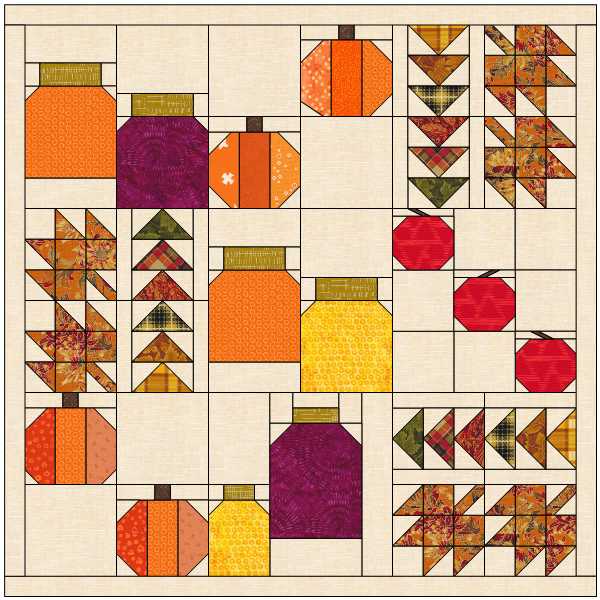
I opened up the lesson in the book, opened EQ8 on my computer, and went through the Chapter 3 lesson as I did before. When I completed the lesson, I pulled blocks from the applique section, as well as a couple of pieced blocks in a fall theme. I colored the pieces with fall fabrics. This one I might actually make. It needs some tweaks, but the concept is here. And, in the second lesson I worked through, I learned several new things. This book is a gold mine for unlocking the potential of the software.


Are you intrigued? Ready to take your designing to the next level? EQ8 Designing More Quilts is written by industry experts in design. Contributing authors are Nancy Mahoney, Reeze Hanson, Lori Miller, Barb Vlack, Kristina Brinkerhoff, Yvonne Menear, Kari Schell, and Amy Ellis. Here is the publisher’s description of the book – Each of the 8 chapters is a stand-alone lesson, in that you can work through the chapters in any order you want. Follow the author’s instructions to create eight extraordinary quilts. You will be drawing blocks based on photos, designing a quilt with digital fabric panels, using a mathematical formula and special layouts to create amazing optical illusions, and so much more! Use the knowledge from the techniques you learn and make each quilt your own. This 136-page fully illustrated book has a convenient spiral binding that allows pages to rotate 360 degrees and lie flat. Written for EQ8 Windows and Mac users. See below for a special offer for this weekend only.
I already knew how to add a photo to the library and use it as a panel which is in Chapter 7. The book has a lesson on cropping bits out of a panel to use small parts alongside a bigger panel in a custom set quilt. This feature is great for using those panels that have a bunch of small motifs alongside one larger one. This one I did a while ago when the Night Flight fabric line was on the free download. But, it illustrates nicely the border options again.


Not quite ready for this level of design? The program can make designing easy for the beginner, too. EQ8 Lessons For Beginners help beginning designers to understand the basics of the program, navigating the worktables and libraries, and getting started with basic design.
And now the special news, Electric Quilt is having a sitewide Labor Day Sale with 20% off all EQ8 software for PCs and Mac computers, add-ons, books, and printable fabrics! If you’ve thought about buying this software, now is the time! The discount applies to the books, too. (Classes and EQ Membership excluded.) Use Promo code: LABORDAY20 – it’s good through the weekend.
Have you played with design software? Would you like to?
 From My Carolina Home
The ‘learn to quilt’ class I took resulted in a medallion quilt, although now I expect I’d call it a mystery quilt-a-long. Four little log cabins, many little pinwheels, 4 quadrants of paper piecing, & learning how to calculate borders resulted in a lovely table topper. Having this driven by computer would sure speed up the process.
I’m sure it helps keep your brain sharp.
I love playing with EQ8. Most of the quilts I design will never made sewn. Most of the time I plot out quilts to experiment with colorways. The book you referenced looks like it would be very useful.
Amazing what you can learn when you spend time with the manual. There is a master designer in all of us. I don’t have EQ8 myself but have seen others having a ‘play’. Great fun!
Mary :))
It does seem like everything in the quilt books and magazine and a lot on line too are aimed at easy – get it done as fast as you can type of quilts. My fairly new local quilt shop is like that too – I think the owners are fairly new at quilting too and all their designs on the walls are easy peasy quilts trying to pull in beginners.
Wish I could afford EQ8. After some major house repairs it is not in my budget and probably never will be at this rate. I can enjoy looking at all your lovely designs.